

Teaching and research

Cogniti is an education-first GenAI platform developed by the University of Sydney. It has been designed to let teachers build custom chatbot agents that can be given specific instructions, and specific resources, to assist student learning in context-sensitive ways.
Unlike many generic GenAI tools, Cogniti is purpose built for education, by educators. It supports equitable student access to advanced models, and options to anchor responses in reference to your own course materials and context.
The University of Sydney group behind the platform, driven by the centrality of human teachers and the importance of pedagogy, describe it as Steerable, Resourced, Equitable, and Insightful.

| Create AI agents and control how they will interact with students. | Provide your AI agents with web pages, files, and other resources to answer more accurately. | Provide all students with the same access to powerful AI agents. | Understand how your students are interacting with AI agents, to inform your teaching. |
Following a successful trial across more than a dozen courses, access to Cogniti is now available for Course Coordinators to use from Trimester 2 and Mid-Year Term 2026 onwards. This page has been developed to outline the process for accessing the platform, describe the expectations for academics who elect to use the platform in 2026, and describe options for help and support.
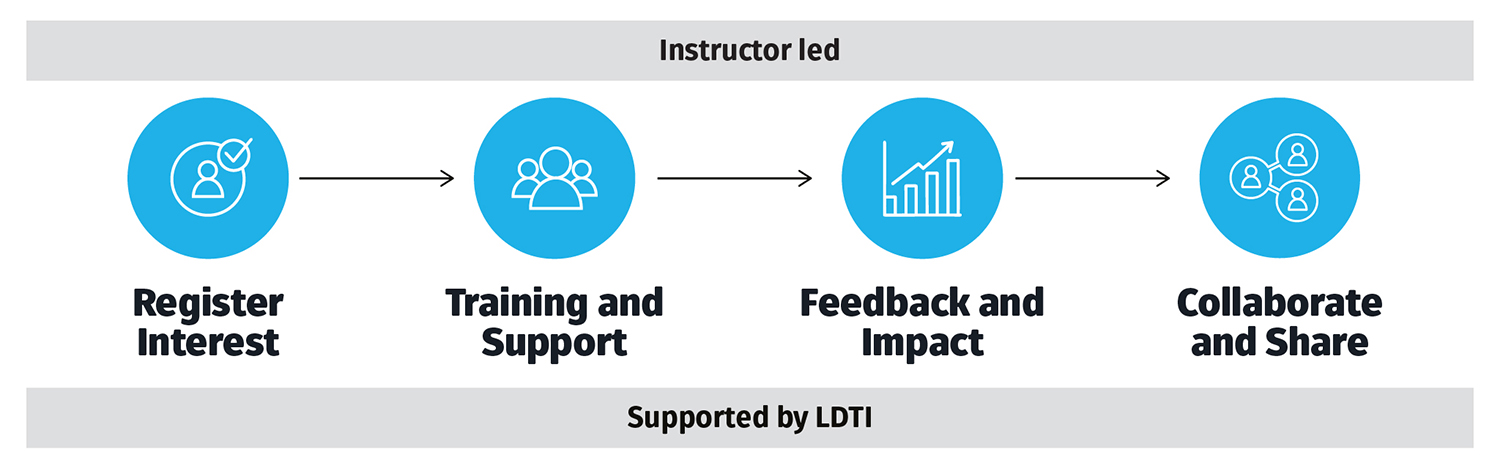
Throughout the trial stage, academics using the platform noted the relative ease of set up and intuitive, user-friendly interface. Based on this feedback, implementation of Cogniti assistants will be led by individual educators with support provided by LDTI staff.
Introduction and Access
Cogniti was launched on 02 April 2026 with an introductory session presented by Professor Danny Liu from the University of Sydney.
Click here to view a recording of the Introduction to Cogniti session.
All staff can access the Cogniti platform using their University credentials via single sign on at https://cogniti.newcastle.edu.au/. Please make sure that you can log on BEFORE requesting access to create agents.
Course Coordinators - Access to create agents
Course coordinators can request access to create Cogniti agents by completing this form:
Course Coordinator Agent Creation Request
Upon receipt of this request, LDTI will provide access to create up to 3 agents. We will also provide additional instructions for use and details on how to access additional support.
Access for non-academic staff
Cogniti is an education focused platform intended for use within courses and programs. Professional staff who would like to request access to Cogniti, or discuss other potential GenAI solutions should contact the Digital Technology Solutions GenAI team at dts-generativeai@newcastle.edu.au.
More information is available from Digital Technology Solutions at Strategic Initiatives - Generative AI.
 Throughout the first year of use at our institution, academic staff who choose to use Cogniti in their course(s) will be required to engage in some low touch feedback opportunities.
These will help improve the use of the platform across the institution and inform decisions about continued use beyond 2026.
Cogniti users will be required to:
- Consent to 2-5 standard questions being included in their Course Experience Survey. Results from these surveys will be de-identified and used only to gauge student sentiment on Cogniti. LDTI will work directly with Strategy, Planning and Performance to add these questions to the relevant 2026 CES surveys. Course Coordinators will also have access to their own results.
- Consider opportunities to utilise LDTI’s Mid-Semester Student Feedback process to source actionable student feedback to feed directly into your current teaching or future iterations of the course.
- Complete a brief end of term questionnaire (administered by LDTI) on their views of Cogniti in their course(s).
 Sector-wide and internal collaboration strengthens collective expertise.
Effective GenAI practice grows through open exchange of insights among colleagues, universities, professional bodies and industry, and through focused dialogue within each academic field to address its unique standards and challenges.
By sharing knowledge at all levels, we can refine our strategies and stay aligned with emerging expectations.
A guiding principle from the GenAI in Teaching, Learning, and Assessment Action Plan
To help our academic community learn more about the potential benefits and risks of GenAI in education, we hope that users will take the opportunity to participate in opportunities to share their successes (and failures!) using Cognit in 2026.
This may include
- Presenting at the Educator Network (tEN) events such as showcases and learning lunchboxes.
- Collaborating with LDTI on AI in Action Bite Size Teaching Sessions.
- Appearing in future instructional and support videos.
- Share your experiences via the AI Community of Practice
- Considering opportunities to participate in external events such as the annual University of Sydney Cogniti Mini Symposium.
LDTI can provide guidance and assistance. However, as with any educational technology or learning materials, Course Coordinators are ultimately responsible for how it is used and the quality of their teaching and learning experiences.
Additional information is available under Course Coordinator Responsibilities in the Course Design and Management Manual.
Before deploying an agent for student use, course coordinators must test and refine their agent to ensure they are comfortable using it in their teaching. This should include iteratively testing to investigate how your agent responds, and refining and adjusting your system message. Coordinators should also continue to monitor interaction and outputs after deployment.
See more on the Cogniti website at:
Support and Guides
For detailed help documentation, refer to the Cogniti Website. Additional UON support resources and videos are currently being developed and will be available soon.
LDTI’s Cogniti Users Drop-In Sessions are intended as an platform for staff to come together to discuss their use of the platform, and share what is working and what is not. We will also discuss any upcoming enhancements, new support resources, etc. These are informal opportunities to discuss the platform and learn from colleagues.
- Dates: 21 May, 04 June, 19 June, 01 July, 23 July (more to come later in the year)
- Time: 12.00pm to 12.30pm
- Where: Online (via Zoom)
Cogniti users check in - 21 May 2026
This session covered:
- An update on use and statistics.
- Discussion of Content Filters and Flags.
- Cogniti Interactive Mini-Apps.
- User Feedback and Questions.
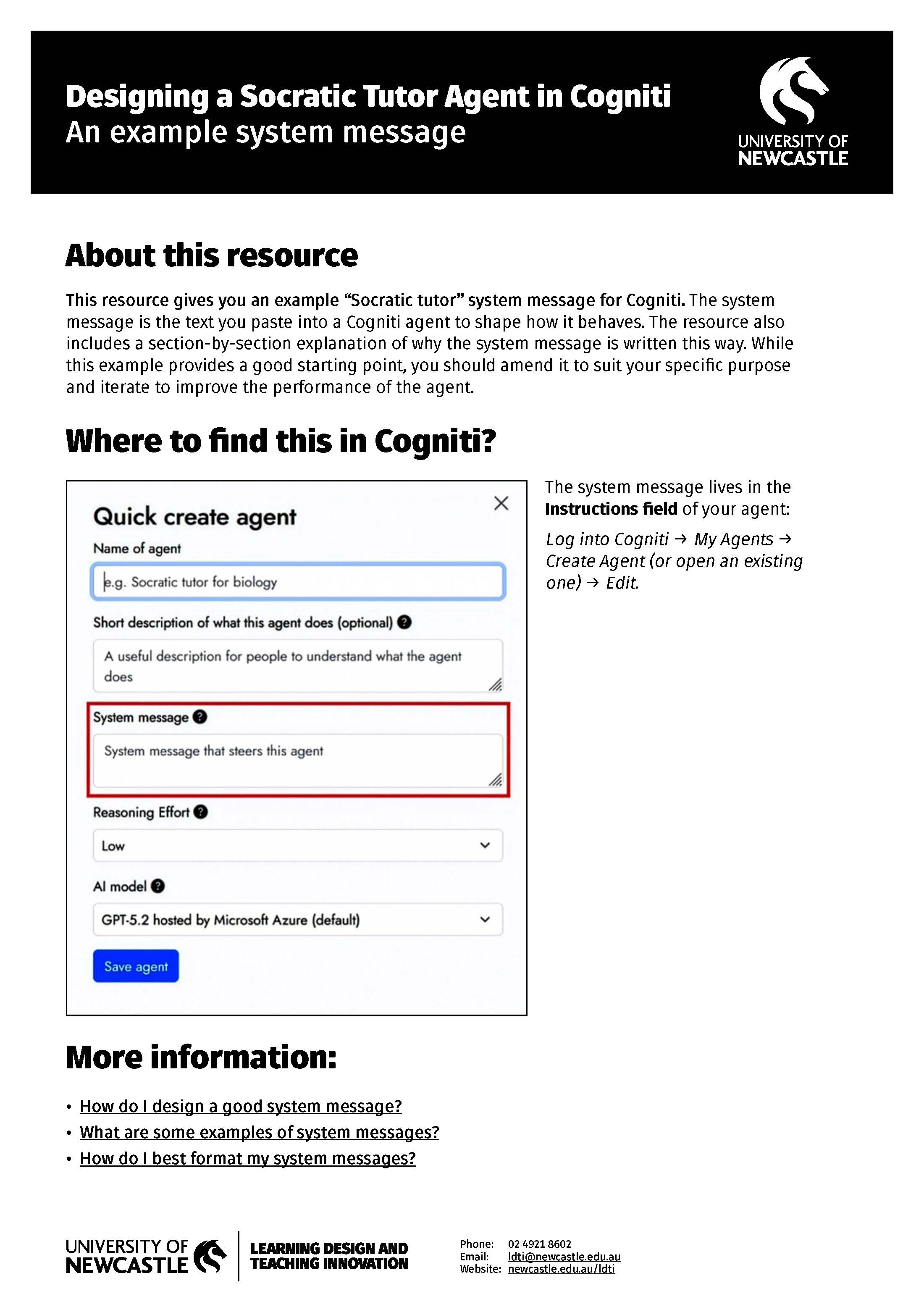
The system message (or prompt) ‘steers’ the generative AI model to do what you need it to do. The system message is the plain language instructions that tell your Cogniti agent how to act. It operates in the background and the user/student does not see the system message.
Like any good prompt, a good system message should have a few components:
- Role: generative AIs tend to function best when they are given a role or persona. For example, “Act as a Socratic tutor”, “Act as a first-grade teacher”, “Act as an expert tutor in college”. It’s also important to help the AI understand who the user is. For example, “The user is a student studying … who needs to …”.
- Task: having a clear task for the AI to do helps to steer it productively. For example, “Your role is to help the user to … by …”.
- Requirements and instructions: it’s important to define the parameters within which the AI needs to complete the task. In the Socratic tutor example above, the rules section provides guidance to the AI about how it should approach behaving in this role.
Examples and Additional Information
| The LDTI Designing a Socratic Tutor resource includes an example prompt that can be edited to suit individual needs. Additional resources are available from the University of Sydney at: |
Cogniti leverages Microsoft’s AI Content Safety filters to keep AI inputs and outputs safe. In practice, this means that conversations (student inputs) may be flagged for review if they breach filters across one of several categories. Students will see an automated message if a comment has been flagged.
The “tolerance” for each of these is customisable at an institution level. Standard tolerance is often overly risk-avoidant, particularly when Cogniti is used to simulate medical discussions. Students can simply continue the conversation if a comment is inadvertently flagged.
While it is the responsibility of the user (the Course Coordinator) to monitor interactions with their agent, LDTI Cogniti admins monitor all flagged conversations. This will be used to inform future changes to filter tolerances.
Tip for Users
- Course coordinators who are using Cogniti should include explicit statements about how and why Cogniti will be used in their course site. This should note that conversations may be inadvertently flagged.
Once you have created (and tested) your agent, you can embed it within Canvas by following these instructions from the University of Sydney Help page: How do I embed a Cogniti agent into Canvas?
Note: LTI plugins are already enabled, so you will not need to request that.
Additional Information
In early 2026, LDTI welcomed a number of academic staff from other institutions to speak with out community about their use of Cogniti. Recordings are available at LDTI Sector Voices, or via the direct links below:
- Cogniti and Law Education (Joanna Ernenwein and Tyler Sprague, University of Sydney Law Extension Committee)
- Cogniti and Statistics Education (Minh Huynh and Dr Liana Pozzo, University of Sydney)
- Cogniti and Sports Marketing Education (Dr Sarah Wymer, Auckland University of Technology).
- Cogniti and Biochemistry Education (Dr Barbara Hadley, Griffith University).
The platform provides flexibility to create agents and assistants that can be applied to support a variety of educational use cases.
Some of the more common applications include:
Course Tutor: Agents built to support students’ engagement with course content.
Some examples:
- Enhancing scientific writing skills with automated pre-submission review. Minh Huynh and Osu Lilje, University of Sydney. 2024 Cogniti Mini Symposium
- Engineering Bots That Outperform ChatGPT: A Faculty-Wide Initiative. Gobinath Rajarathnam, The University of Sydney. 2025 Cogniti Mini Symposium
- Advancing Equity Through 24/7 Law Tutoring Agents. Tyler Sprague, The University of Sydney Law Extension Committee. 2025 Cogniti Mini Symposium
- Meet Artificial Ian: Large-Scale AI Tutoring in Psychology. Ian Johnston. The University of Sydney. 2025 Cogniti Mini Symposium
- High Impact Teaching Meets AI Tutoring. Jason Szkwarek, Carroll College Broulee. 2025 Cogniti Mini Symposium.
- NiNA and EdNA: Reducing Mathematics Anxiety Through AI Support. Luis Camacho, Federation University. 2025 Cogniti Mini Symposium
- Student-built AI prototype 'Attune' explores new frontiers in legal tutoring. University of New England. Lab Next 70.
- Lexi LawScribe - Legal writing tutor. University of New England. Lab Next 70.
- Dr MattTabolism – an AI assistant that helps me help students with biochemistry. Matthew Clemson, Minh Huynh and Alice Huang. University of Sydney
Feedback and Assessment Preparation: Agents that provide opportunities to access AI feedback or engage in practice assessment.
Some examples:
- AI Agents for Interactive Oral Assessment Preparation. Benjamin Miller, The University of Sydney. 2025 Cogniti Mini Symposium
- Scaling Feedback in Radiology Education. Ryan Smyth, Murdoch University. 2025 Cogniti Mini Symposium
- Scaling Formative Feedback in Large Cohorts. Osu Lilje, Michael Widjaja, and Januar Harianto. The University of Sydney. 2025 Cogniti Mini Symposium
- Let’s TALK About It: Revealing Student Thinking Through AI voice chat. Angela Sun and Helen McGuire. The University of Sydney. 2025 Cogniti Mini Symposium.
- Kind But Firm: AI Mentoring for Pharmacy Teamwork. Thai Duong Pham, Monash University. 2025 Cogniti Mini Symposium.
Digital Clients: Agents built to facilitate students’ engagement in digital experiences through engagement with virtual patients, clients, students, etc.
Some examples:
- Virtual patients help physical therapy students hone interview skills. Soo Kim, University of Saskatoon. 2024 Cogniti Mini Symposium
- Practising clinical assessment skills: using AI agents to simulate challenging patient interactions. Susan Batur and Damhnat McCann, University of Tasmania. 2025 Cogniti Mini Symposium
- From Generic Feedback to Industry Voice: Designing Jack from Auckland FC. Sarah Wymer, Auckland University of Technology. 2025 Cogniti Mini Symposium
- Safe Practice Spaces: AI Client Simulations for Legal Communication Skills. Nicole Landy. Queensland University of Technology. 2025 Cogniti Mini Symposium
- From Passive to Active: AI Patients Transform Nursing Tutorials. Luke McLean. Federation University. 2025 Cogniti Mini Symposium
- Teaching Critical AI Engagement Through Linguistics. Silvana Arriagada Anabalón and Joaquín Cárcamo. Pontificia Universidad Católica de Chile. 2025 Cogniti Mini Symposium
- Exploring chatbot simulations to support pre-service teachers’ classroom management practice. Western Sydney University. 2025 AI in HE Symposium ANZ
- Simulating the newsroom: AI-powered learning for aspiring journalists. Steinar Ellingsen, Edith Cowan University. 2024 Cogniti Mini Symposium
Course Assistant: Agents built answer questions about the course (assessment dues dates, contact info, etc).
Some examples:
- Helping students navigate course information with AI support. Michelle Chen, University of Sydney. 2024 Cogniti Mini Symposium
- From Overly Helpful to Accurate: Refining a Student Support Agent. Jeanette Hobbs. College of Law New Zealand. 2025 Cogniti Mini Symposium
Course/Learning Design Support: Agents built to assist and augment design processes.
Some examples:
- From tech advice to rubrics: How AI streamlines educational design. Nawal Chanane and Jason Cui, Auckland University of Technology. 2024 Cogniti Mini Symposium
- From Blank Page to Best Practice: AI-Assisted Rubric Development. James Macaulay, Queensland University of Technology. 2025 Cogniti Mini Symposium
Specific Learning Activities: Agents designed to allow students to complete specific learning activities.
Some examples:
- Beyond the style guide: AI-powered referencing learning support. Craig Wattam. Auckland University of Technology. 2024 Cogniti Mini Symposium
- Three Agents to Support Students Through Placement. Rene Fraser, Amelia Yarwood, Celine Serrano-Diaz. The University of Sydney. 2025 Cogniti Mini Symposium
- Cogniti Agents for Language Development. Marie-Laure Vuaille-Barcan and Eva Duffayet, University of Newcastle. LDTI AI in Action Bite size Session.
The use of GenAI is a relatively new topic. However, as adoption continues to increase, more information and studies are becoming available. Some further reading is included below:
- Chung, A. T.-H., Zhang, B., Kung, L.-C., Bastani, H., & Bastani, O. (2026) Effective personalized AI tutors via LLM-guided reinforcement learning. Available at SSRN: https://ssrn.com/abstract=6423358 or http://dx.doi.org/10.2139/ssrn.6423358
- Belkina, M., Daniel, S., Nikolic, S., Haque, R., Lyden, S., Neal, P., Grundy, S., & Hassan, G. M. (2025). Implementing generative AI (GenAI) in higher education: A systematic review of case studies. Computers and Education: Artificial Intelligence, 8, 100407. https://doi.org/10.1016/j.caeai.2025.100407
- Kestin, G., Miller, K., Klales, A. et al. (2025). AI tutoring outperforms in-class active learning: an RCT introducing a novel research-based design in an authentic educational setting. Sci Rep 15, 17458 https://doi.org/10.1038/s41598-025-97652-6
- Flenady, G., & Sparrow, R. (2025). Cut the bullshit: why GenAI systems are neither collaborators nor tutors. Teaching in Higher Education, 1–10. https://doi-org.ezproxy.newcastle.edu.au/10.1080/13562517.2025.2497263
- Tibbs, A. (2025). Building capacity for AI-powered learning: A collaborative trial of conversational agents in higher education. 2025 ASCILITE Conference Proceedings. https://doi.org/10.65106/apubs.2025.2647
- lsaiari, O., Baghaei, N., Lodge, J. M., Noroozi, O., Gašević, D., Boden, M., & Khosravi, H. (2026). Directive, metacognitive, or a blend of both? A comparison of AI-generated feedback types on student engagement, confidence, and outcomes. Computers and Education: Artificial Intelligence, 10, Article 100553. https://doi.org/10.1016/j.caeai.2026.100553
- Henderson, M., Bearman, M., Chung, J., Fawns, T., Buckingham Shum, S., Matthews, K. E., & de Mello Heredia, J. (2025). Comparing Generative AI and teacher feedback: Student perceptions of usefulness and trustworthiness. Assessment & Evaluation in Higher Education. https://doi.org/10.1080/02602938.2025.2502582
- Schneider et al. (2020). The Effectiveness of Intelligent Tutoring Systems: A Meta analysis. Journal of Ed Psychology. AI Tutors Outperform Traditional Teaching Methods in Groundbreaking Harvard Study
Access to Cogniti aligns with the University’s commitment to empowering educators to design teaching sessions, materials and assessments that incorporate the creative use of GenAI tools where appropriate.
LDTI will implement monitoring and evaluation mechanisms to assess the effectiveness of Cogniti in educational practices and will help foster a culture of innovation by encouraging and supporting experimentation with Cogniti.
More information is available at Policy on the use of Generative AI in Teaching, Learning and Assessment.
The University of Newcastle acknowledges the traditional custodians of the lands within our footprint areas: Awabakal, Darkinjung, Biripai, Worimi, Wonnarua, and Eora Nations. We also pay respect to the wisdom of our Elders past and present.