

Security, safety and help on campus
Navigating the SafeZone app
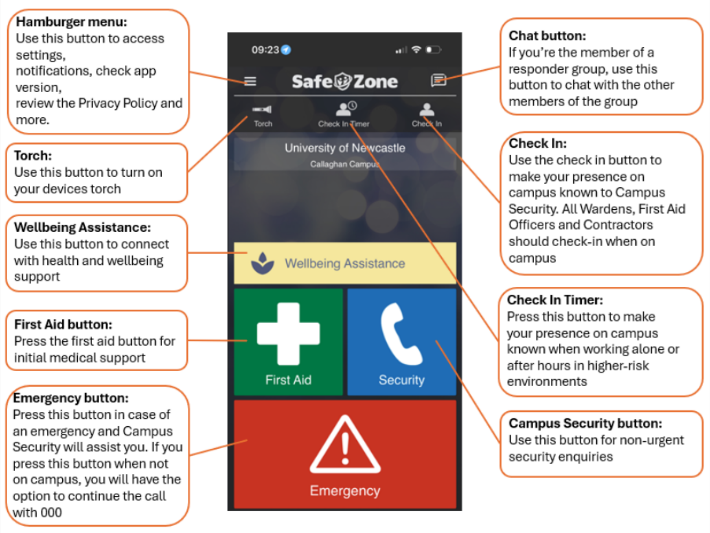
This guide aims to assist users navigate the SafeZone app from their mobile devices.
The Home Page
This resource is designed to provide you with the information necessary to navigate the app seamlessly.
The Menu
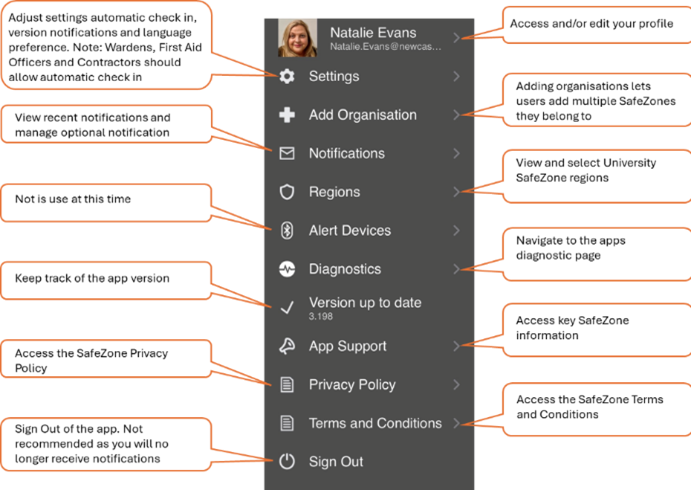
Select the Hamburger menu button on the homepage to explore the available features. Then, tap on any of the following:
The University of Newcastle acknowledges the traditional custodians of the lands within our footprint areas: Awabakal, Darkinjung, Biripai, Worimi, Wonnarua, and Eora Nations. We also pay respect to the wisdom of our Elders past and present.