

SafeZone
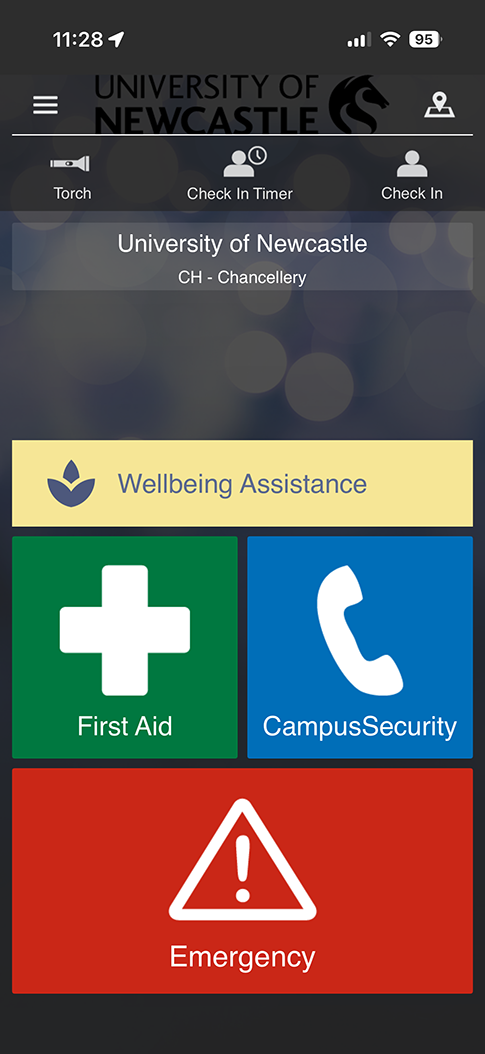
SafeZone is our University’s safety and emergency communication system.
SafeZone helps keep our campus community safe by linking staff, students, contractors and visitors directly with Campus Security and emergency responders.
It also allows the University to send safety alerts based on your location during emergencies or incidents that may affect people on or near campus.
Using the SafeZone mobile app, you can:
- request emergency help
- contact Campus Security
- access wellbeing support services
- receive safety alerts relevant to your location.
SafeZone supports the University’s commitment to a safe and supportive environment. It also helps us respond quickly and effectively when assistance is needed.
This page provides information about how SafeZone works, how to download the app, when to use it, and answers to common questions.
Introducing SafeZone 1:38
SafeZone helps keep our campus community safe by linking staff, students, contractors and visitors directly with Campus Security and emergency responders.
SafeZone on your phone 1:34
The SafeZone app connects you to help if you ever need it while you are on any of our campuses.
Download SafeZone
SafeZone is a free mobile app available for Apple and Android devices.
Downloading the app ensures you can receive safety alerts relevant to your location and quickly contact Campus Security if assistance is required.


Key features
SafeZone lets you quickly access safety support and important information while on campus or taking part in University activities. You can use SafeZone to:
- Request emergency assistance.
Contact Campus Security immediately during an emergency. Your location is shared so responders can reach you quickly. - Get security assistance.
Contact Campus Security for non‑urgent safety concerns or help. - Request first aid assistance.
Ask for help from trained first aid responders on campus. - Access wellbeing support.
Use links to wellbeing services for staff and students. - Receive safety alerts.
Get notifications about incidents that may affect your campus or location, including severe weather, safety issues or disruptions. - Check in when working alone.
Let Campus Security know you are working or studying alone. If you do not check out before the timer ends, Security will follow up to make sure you are safe.
When to use SafeZone
Use SafeZone whenever you need assistance or safety information on campus.
- you need urgent help or want to report an emergency
- you need to contact Campus Security for non-urgent assistance
- you require first aid
- you are working or studying alone on campus
- you want to receive safety alerts for your location.
SafeZone supports existing emergency systems such as building alarms and evacuation procedures, which should always be followed during emergencies.
Location and privacy
SafeZone is designed with privacy in mind.
The app does not track your movements. Your location is only shared with responders when you:
- request emergency assistance
- request first aid assistance
- use the check‑in feature.
This information helps responders find you quickly and provide help when it matters.
Quick links
User guides
- How to download and register the Safezone app
- How to download and register the Safezone app (non University users)
- Navigating the Safezone app
Need help or want to give feedback?
If you have issues with the SafeZone app or would like to share feedback, contact us at
safezone@newcastle.edu.au
The University of Newcastle acknowledges the traditional custodians of the lands within our footprint areas: Awabakal, Darkinjung, Biripai, Worimi, Wonnarua, and Eora Nations. We also pay respect to the wisdom of our Elders past and present.